Haven't posted in a while so here is what I was up to. At the end of the last year I worked with animationRigs.com and Motion Grinder on one of the oldest and coolest game series ever made. It was my job to take care of weight painting and to create poses for the facial rigs of Rudi, Agent One and a few other characters. Here is the game in its full glory:
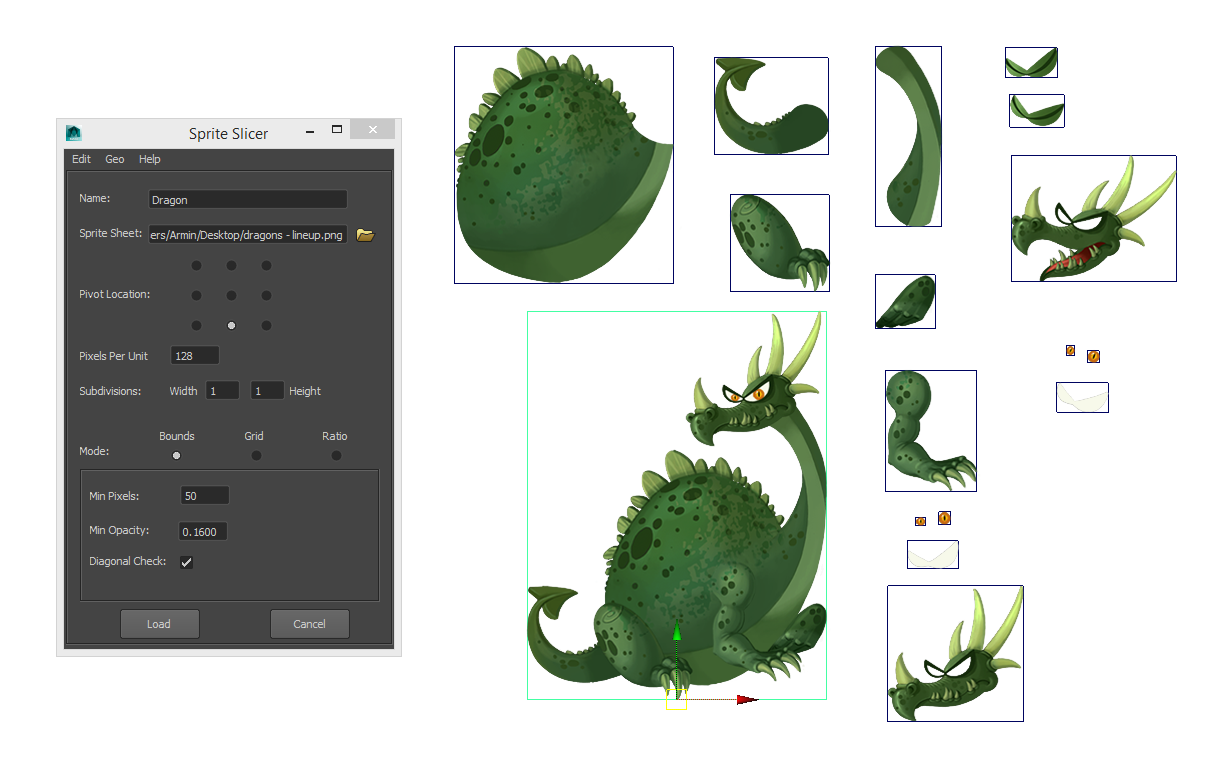
Sprite Slicer is a tool that significantly speeds up the creation of image planes or sprites in Maya. It automatically generates the planes in the correct aspect ratio with perfectly aligned UVs. The smart algorithm in Bounds mode recognizes all separate shapes and creates sprites for them. Additional settings allow you to fine tweak the shape recognition.
The tool is also great for importing of reference images or any textured planes that will be used for modeling, for example hair strands, grass, leaves...
Watch the video to see how the tool works and to see different import modes in action:
The dragon character is from Bubble Rumble, download it for IOS and Andorid.
If the video is not enough here is a reference for all of the tools options:
Name: Specify the name that all the sprites will be named to. They will automatically be numbered. If no name is specified, "sprite" will be added as the default name.
Sprite Sheet: URL for the image to be loaded. It can be entered by hand or if you click the folder icon a dialog will open that will allow you to specify an image on your system.
Pivot Location: Specify the region of the sprites that their pivot will be snapped to. The pivot can later be edited by Maya's standard tools or by going into the top menu of Sprite Slicer and selecting an option from Geo/Set Pivot.
Pixels Per Unit: This value specifies how many pixels are going to be created per one Maya unit. In other words it specifies the scale of the image planes. The larger the value the smaller the planes will be, and vice versa.
Subdivisions: The created planes will be subdivided in width and height by the amount specified in these two boxes.
Bounds: In this mode the sprites will be created for all separate shapes in the image. These shapes can later be combined with Maya's modeling tools or by selecting them and clicking on Geo/Combine option in Sprite Slicer's top menu.
Min Pixels: Minimum number of pixels that every separate shapes need to have in order to be considered a separate sprite. Tweak this amount if your sheet contains stray pixels or very small shapes that are part of a larger shape.
Min Opacity: Specify a value between 0.0 and 1.0 and the pixels that have an alpha value lower than the specified value will be ignored when searching for separate shapes.
Diagonal Check: When importing very small sprites, like pixel art, this option allows you to specify if you want to consider pixels that are connected only by their corners as part of the same shape. Keep this option unchecked if importing larger images since it will unnecessarily slow things down.
Grid: In this mode the sprites will be created based on the sprite size that is specified in the fields bellow.
Sprite Size: The size of the sprites by which the sheet will be divided. These values are in pixels. The tool will start to fit as many sprites as it can, starting from the top left corner.
Offset: Starting from the top left corner of the image the amount specified here will offset the sprites. These values are in pixels.
Padding: These values separate the sprites from each other by the amounts specified. These values are in pixels.
Ratio: In this mode the image is cut into a grid based on the ratio specified in the fields below.
Divisions: The ratio that the image will be cut in. The X amount is the number of sprites columns in the grid and the Y amount is the number of rows in the grid.
Offset: Similar to the offset in Grid mode, only in this mode you have the option to offset from all four sides of the image.These values are in pixels.
Padding: These values separate the sprites from each other by the amounts specified. These values are in pixels.
Load: Import the selected image with the specified options.
Cancel: Discard the specified options and close the Sprite Slicer window.
Edit: The Reset Settings option is in this menu. It resets all the values to their defaults
Geo:
Combine: Combine the selected planes. You need to have at least two meshes selected.
Set Pivot: Sets the pivot of the selected objects to the specified corner.
Help: A link that opens in your browser and it brings you to this page.
01. Elephant Rig
Creature rigging in Autodesk Maya using Maya Muscle. A custom flexible
auto rigging script for the Variable FK trunk was written in PyMel.
02. Variable Foot
Organic and flexible foot posing using only a couple of controls without
stacking of a large number of variable foot parameters. This solution
allows the animator to position the pivot on any part of the foot and
control the direction and falloff of the bend.
03. Delta Mush
This deformer is based on Voodoo's Delta Mush deformer and requires
almost no skinning work to be done. Using the vertices tangent space it
provides a smart deformer that preserves volume and shape.
04. Smooth Skin Decomposition
The results of using the Delta Mush deformer are decomposed and applied
to the rigid skin of the character. This solution produces a skin with
deformations that are as close as possible to the Delta Mush
deformations.
05. Bezier Spine
An animation friendly spine rig that uses a minimum amount of animation
controls without sacrificing any flexibility. The chest and hip
controllers can change their location and provide different points from
which the spine bends. By adjusting the chest and hips tangent handles
the spine shape can be further defined and tweaked.
06. Shape Rasterizer
A 3D shape is projected onto a plannar mesh and rasterized to create a
look that immitates low resolution screens. The shapes vertex colors are
used to define the colors of this rasterized shape.
07. Herman and Chad
Responsible for body and facial rigs, skinning, UI writing and rig maintenance.
08. Spherical Mirror
Written in Fabric Splice for Maya. Creates a mesh instance that is mirrored using a spherical mirror. Supports animation.
09. Wheel and Threads Node
Custom node written in Fabric Splice for Maya. The node provides a
complete solution for wheels and threads. The wheel rotation works in
world space and works in any direction. The same is true for the
threads. The thread mesh is automatically instanced and the thread
control points define the shape, size and rotation of the threads.
I'll show you how you can use some basic math knowledge to manipulate points in 3D space. Knowing vectors and points will allow you to fully understand how objects are positioned, translated around, how matrices work, how quaternions are rotated, aim constrains calculated and much, much more.
First let me show you what we will be making and after that you will see how easy it is to make something like this:
The Zetz character is designed by Boris Stapic and the model and textures are from Seid Tursic.
This is made using Fabric Splice in Maya. Here is the download link for the splice file. Have fun with it. I will not cover the Splice part in this tutorial but you can go through my code and see how it is written. I also included some debuging code that draws the sphere.
I will be writing the tutorial in pseudo code, and everything might not be notated to mathematical standards. I'm trying to make everything easy to read and I leave it to you to figure out how to do it in the language and software of your choice.
So, here is what we are going to start with:
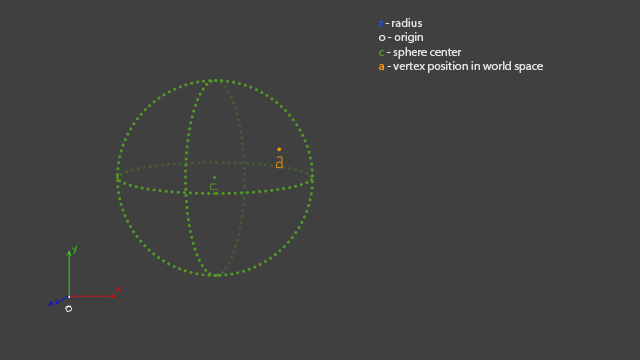
The origin is just the center of our world, radius is going to be an attribute that the user can modify, sphere center is the location of our sphere and the vertex position is what you will get from your application when you query the location of a vertex. This doesn't have to handle vertices, you can write a version that mirrors locators or any other objects.
Now we have to calculate a vector that will point from "c" to "a" so we know in what direction to mirror the object.
The next step is to make "a`" go from "c" to the spheres border. That is easy to achieve. We need to make "a`" a unit vector ( we set its length to 1 ) and we multiply that unit vector with the radius.
To know how far the mirrored point needs to be from the spheres center we need to calculate a multiplication factor. The factor is the number that we get when we divide the radius by the length of "a`". We will multiply "b" with this factor to get the position of our mirrored point.
Now we have our point mirrored and its location based on the sphere center. In order to get the location in the world we add up this vector to "c".
And that is how we go from "a" to "am". I leave it to you to write this in the software of your choice and if you have any further questions write them in the comments. But first make sure to try and figure everything out by yourself.
If you have not already seen Hans Godard's vimeo page then you should go there now. That man does some great work and is a huge inspiration.
His latest video demos a workflow for automatizing smooth skinning. I tried to do something similar but couldn't crack the math for SSD. So I did it my own way. The most important thing is that it works and gives good results.
My version is based on Splice and Python. Python slows things down a lot but I am getting into C++ so the next version will be full Maya C++ API.
Even with Python I didn't have to wait too long. With a 12k vert mesh and 85 skinned joints the procedure was done in a bit more than 5 minutes 3m30s (did some optimizing). That still beats doing it by hand and painting the weights until the wrists start to hurt.
A big thank you to Jonas Törnqvist for giving me the model for testing. Great modeler and a great guy.
Combining the best out of FK and IK spine rigs and adding even more. IK/FK spines are allow much control over the torso but are tedious to animate. A lot of layered controls on top of each other can require some counter rotating and produce gimble issues. With this setup the animator can rotate from various points on the spine. Similar to FK but FK requires the user to distribute the rotation across multiple controls if fluid shapes are required. And they always are.
On my setup most of the posing is handled with the rotation of the two main controls and can be further refined using the tangent controls and the translation of the main controls.
Advanced volume preservation controls plus the IK like behavior that can be achieved with this setup are great for stylized animations.
The foot is one of the areas that doesn't get special attention when rigging a character. Many rigs have the standard inverse foot setup that makes the animator slide a bunch of attributes and try to get something they like.
I like to keep everything on the character without messing too much with sliding numbers in tiny boxes. That way the animator can quickly experiment with poses and get organic shapes.
As seen in the video the foot is really flexible and allows for easy posing. The bend control can moved to any point along the foot and make the foot bend in any direction. The only slider that requires the animator to take his/hers eyes of the character is used to control the falloff. Falloff control allows the foot to peel nicely from the ground or to bend at a harsh angle. The foot uses the same rig for both IK and FK modes.
One more custom node done in Fabric Splice. This time I tackled a couple of things at once.
First was wheel rotation. This solution is based on the objects world matrix instead of a position value or something similar. The idea was based on one of Rigging Dojo's AIR sessions with Raf Anzovin. The object can have as many controls as you want and it will always calculate the correct roll. I added the possibility to connect a parent inverse matrix so the setup can be a child of some other node. Useful when having world positioning controls on a rig.
The next was a parameter to drive objects along a curve. Similar to the rotation, only the output is different. Instead of outputting an angle value the parameter is a value between 0 and 1.
And the last was instancing. A mesh will be projected on the custom splice curve and it is driven by the parameter value. I extended the BezierXfo class that comes with Splice and added a new function that takes a number of instances and a starting offset as the input. In this case parameter is that offset and it tells the function where the first element should be on the curve. Then the other elements are projected onto the curve with an equal distance between them.
Check out the video bellow to see the node doing its thing:
I've been really busy the last couple of months and things were quiet on my blog. In the meantime I started getting into the Maya API and jumped on the Fabric Splice train. I have a couple of nodes that I want to demo and I will start with the first deformer that I ever wrote. A prototype of the Delta Mush deformer:
The deformer is based on the Delta Mush deformer in Voodoo. You can find more detail about it in this Siggraph paper.
The paper explains it functionality and beside the information they give you all you need is the math to calculate everything.
Maya does not hava a Laplacian smooth deformer so I had to incorporate it in the node. Thanks to Olivier Dionne for sending me a link to this document which contains the necessary calculations for the smoothing.
The node is written in Fabric Splice for Maya. The good thing is that the deformer does not depend on Maya and can be used in any of the Splice implementations (Softimage, 3DS Max among others).
In this thread you can find a lot of useful info on the math behind this and also how to get some of the point data from the mesh. It is great that Roy Nieterau shared it with everyone.
Splice is still under development and even though some things are missing it is already an amazing tool. Especially because of its cross platform compatibility. And how easy it is to do some low level stuff really fast. I am also looking forward to Kraken, an open source cross platform rigging tool.
The model used in the video is downloaded from www.hippydrome.com. A great model and the site is a great resource for everyone.
The video below is showing the deformer in action. I just added some bones and bound the mesh using one influence per vertex, without any weight painting.
In my previous post I explained the math and maya nodes you need to create mirroring of positions in 3D space. Here is a different, more complicated, example where I created a rig that mirrors across any point on a sphere. I used a sphere but it can be any object you want. The only limitation would be a low poly mesh where the mirrored positions would snap since there would not be enough polygons that would provide data on normals that would ensure a smooth transition. In that case I would probably add some nurbs patches that match the poly shape and use their normals.
Mirroring a point across a plane (ex. YZ plane) seems easy but it requires a couple of math tricks to make it work every time. The main tool for achieving this effect is the dot product. It gives us the projections of our point on Y and Z axes and with those values we have almost everything we need for our mirrored position. With a few Maya nodes we can implement this in a scene:
The completed node graph
Same calculations can be done to mirror any object, vertices, curves...
I go into more detail on how this works in the video:
Edit:
This technique was more of a demonstration of some math tricks that could be more useful in many other cases. To do the same mirroring the easy way you can just take the world position of the first object and multiply the x value by -1 and you will get the mirrored position. That is what I would do in a real case scenario because it is faster and more efficient then doing all the math stuff.
This script is inspired by some of TD Matt's blog posts where he goes into detail about skinning and rigging meshes in different poses. He was hosting a script that did the similar job as this one (at least I think it did the same job because I never got to use his script) but the download link is broken. So I made my own version of the tool.
A few things to keep in mind while using the tool:
- The pose data for every joint is written to a custom attribute and the data is preserved if the joints are copied. So make sure to delete it from duplicated joints like those for IK/FK switching so they stay in place while you switch poses on your bind joints.
- When mirroring poses from one side to the other make sure to select joints down the chain because the data is stored in the object space.
- The mirroring function uses the "L_" and "R_" prefixes to find the correct joints. Edit the mirrorPrefixs variable in the script to the prefixes you use. I know that it is not good to hard code stuff but I did it here for the sake of simplicity.
- I was playing around with pymel classes for ui elements and tried to write everything in an object oriented way so it might look a bit weird to you who are used to using flags to set up ui elements. When writing this way there are a lot more lines of code but everything is easy to read and a lot easier to edit.
Hope you find the script useful and let me know if you find any bugs. I will fix them as soon as I can.
As promised here is a video showing the rig. I have also included a small demonstration of the script that I wrote to automate the trunk creation. The technique for the variable FK rig was demonstrated by Jeff Brodsky in this video.
I was only responsible for the elephant rig and deformation. Everything else is done by the guys at Irie studios.
I had the pleasure to work with the great guys at Irie studios on the Elephant Ride video. I was hired to create a rig for the elephants. As requested I used Maya Muscle for additional deformations and muscle simulation. I will record a video that showcases the rig and post it in a few days.
The video premiered on Myspace yesterday.
In this tutorial I show how you can create a sliding pivot foot roll using nodes. The first part of the rig is the same as Chris Lesage's rig but instead of an expression i used nodes. And I only add some stuff on top of that to make it work for any shape.
Make sure to visit Chris's site and check out his awesome reel.
This part will conclude the writing of the bone split script . Here I will show you how to generate the new joints and to position them on the calculated locations. And also how to recreate the hierarchy.
Any comments and questions are welcome.
Thanks for watching.
In this tutorial I will show you how to write a script that can evenly split a bone and add new joints. This is especially useful when you need to add twist joints on an existing bone. It will automatically rename the new joints and keep the original bones orientation.
My terminology might be wrong in some places so sorry for that.
Some experience with Pymel and Maya scripting is required.
If you have any questions please leave them in the comments.